The setOrigin method
| Syntax: | setOrigin(number x, number y) |
|---|---|
| Returns: | nil |
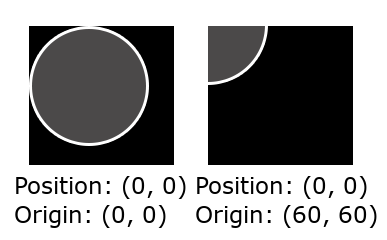
When a sprite is in a certain position, the exact pixel of the image that lands in that position is called the origin. By default, the origin of a sprite is in its top left corner, but you can change it using this method.
You can see how the origin affects the position of a sprite in the following image:
Parameters
| Type | Name | Description |
|---|---|---|
| number | x | Distance in pixels from the left side of the image |
| number | y | Distance in pixels from the top of the image |
Examples
-- Create a sprite
ball = Sprite.new("ball.png", 1)

-- Set the origin of the sprite
ball:setOrigin(60, 60)