Button constructor
| Syntax: | Button.new(string image, number zindex, bool verticalLayout = false)
Button.new(string image, number zindex, string text, bool verticalLayout = false)
Button.new(
string image,
number zindex,
string text,
bool verticalLayout,
table font,
table disabledColor,
table disabledShadowColor
)
|
|---|
Constructs a Button object using the provided background image.
Parameters
| Type | Name | Description |
|---|---|---|
| string | image | The background image of the button; see remarks for details |
| number | zindex | The z-index of this sprite |
| string | text | The text of the button |
| bool | verticalLayout | Whether the layout of the background image is vertical; see remarks for details |
| table | font | The font to use to render the text of the button; see remarks for details |
| table | disabledColor | The color of the text when the button is disabled; see remarks for details |
| table | disabledShadowColor | The color of the shadow of the text when the button is disabled; see remarks for details |
Remarks
The path of the image parameter must be relative to the gui path specified in the config file.
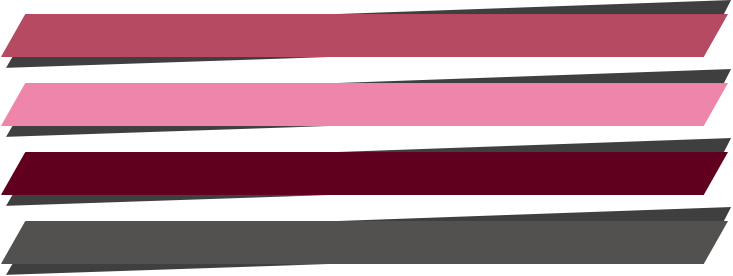
The provided image should include the background for the four possible states of a button in the following order:
- Up: when the player is not interacting with the button
- Hover: when the mouse is over the button
- Down: when the button is being pressed
- Disabled: when the player is not allowed to interact with the button
If verticalLayout is false, the engine expect them to be aligned horizontally,
like in this example:

If verticalLayout is true, they should be aligned vertically, like this:
You can specify the font to use to render the text of the game with a table with the following fields:
| Type | Name | Description |
|---|---|---|
| string | file | Path to the font file |
| number | size | The point size (based on 72 DPI) of the font |
| table | color | A table with the fields r, g, b and a (alpha) specifying the color of the text |
| number | shadowDistance | Distance in pixels of the drop shadow. If 0, no shadow will be drawn. |
| table | shadowColor | A table with the fields r, g, b and a (alpha) specifying the color of the text shadow |
Here is an example:
{
    file = "assets/fonts/Roboto-Medium.ttf",
    size = 28,
    color = {r = 255, g = 255, b = 255, a = 255},
    shadowDistance = 0,
    shadowColor = {r = 0, g = 0, b = 0, a = 0}
}
If no font is specified, the text will be rendered using the same settings as the text window.
The arguments disabledColor and disabledShadowColor should be tables with the fields r, g, b and a (alpha).
Examples
-- Create a button with horizontal layout and no text
button1 = Button.new("exit_btn.png", 1)

-- Create a button with vertical layout and no text
button2 = Button.new("choices_BG.png", 1, true)

-- Create a button with horizontal layout and the text "Start"
button3 = Button.new("start_btn.png", 1, "Start")

-- Create a button with vertical layout and the text "Go to school"
button4 = Button.new("choices_BG.png", 1, "Go to school", true)

-- Create a button with horizontal layout and a custom font
local exampleFont = {
    file = "assets/fonts/Roboto-Medium.ttf",
    size = 28,
    color = {r = 255, g = 255, b = 255, a = 255},
    shadowDistance = 0,
    shadowColor = {r = 0, g = 0, b = 0, a = 0}
}

button5 = Button.new("button.png", 1, "Text", false, exampleFont, {r=255, g=255, b=255, a=255}, {r=0, g=0, b=0, a=0})